
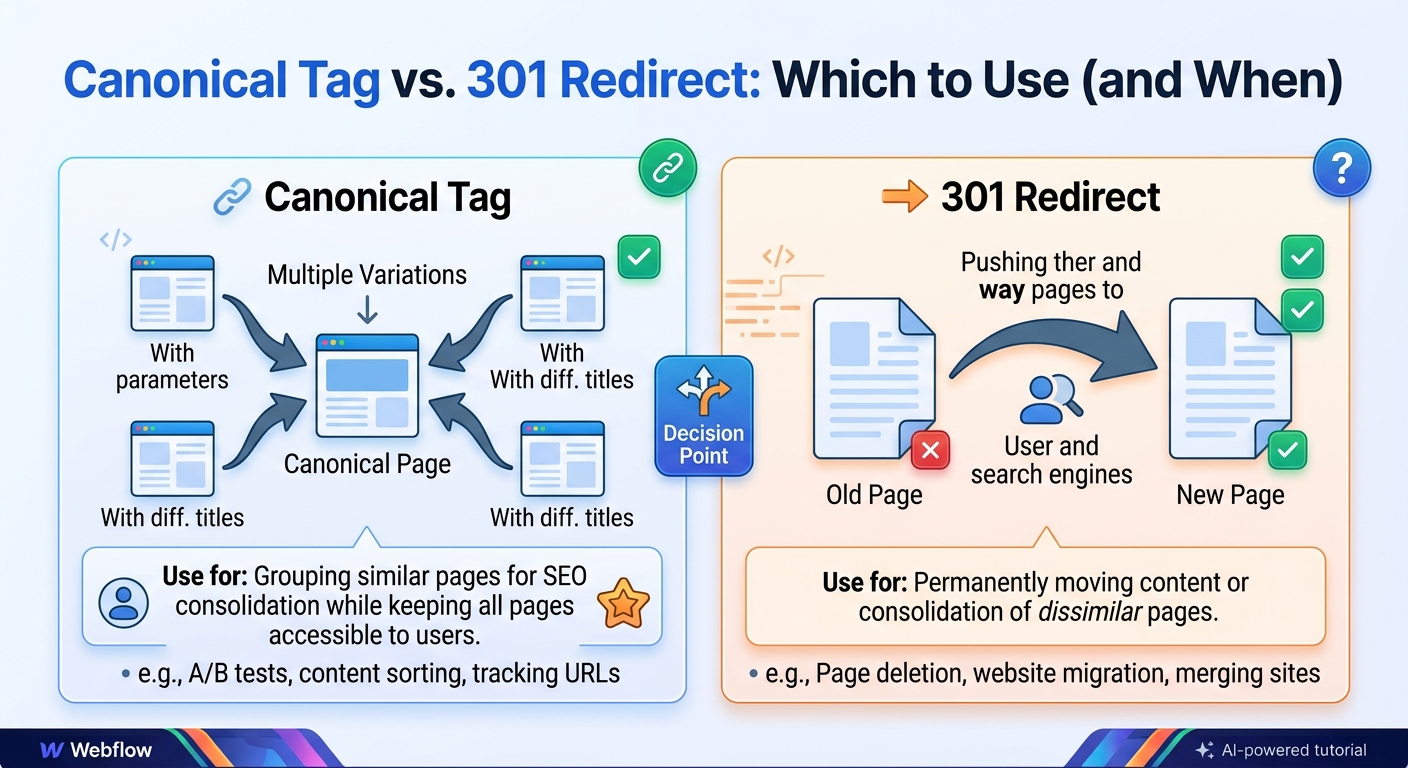
Whenever the same content can be reached at more than one URL, a search engine has to decide which version to index and show. Two of the most common tools for guiding that decision are the canonical tag and the 301 redirect. The redirect vs canonical tag question comes up in almost every site migration, ecommerce launch and duplicate content cleanup, and the two are often confused because both end with several URLs consolidated into one preferred version.
They are not interchangeable, though. A 301 redirect sends visitors and search engines to a new URL and retires the old one. A canonical tag leaves both URLs working and tells search engines which one to treat as the main version. Picking the wrong one can leave duplicates in Google's index, or remove a page that people still need. This guide explains how each one works, when to use it, and how to check that Google has understood your choice.
What is a canonical tag?
A canonical tag, written as rel="canonical", is a line of HTML placed in the head of a page that names the preferred URL for that content. People often search for it as a "canonical meta tag" or "meta canonical", although technically it is a link element rather than a meta tag. In SEO, the process of choosing and signalling one preferred URL among several duplicates is called canonicalization.
The important thing to understand is that the tag is a hint, not a command. Google reads it alongside other signals, such as redirects, internal links and sitemaps, and makes its own decision about which URL to treat as the canonical one. For a wider introduction, see our guide to canonical tags best practices.
What is a 301 redirect?
A 301 redirect is a server response that says a URL has moved permanently. When a browser or Googlebot requests the old address, the server answers with a 301 status code and the location of the new page, and the client goes there instead. For SEO, a 301 is the standard way to tell search engines that the new URL replaces the old one.
Redirects that point every non-preferred version of a URL to the preferred one, such as HTTP to HTTPS or non-www to www, are sometimes called canonical redirects. They are a good example of how the two tools relate: the redirect enforces the preferred version at the server level, and the canonical tag confirms it in the page itself.
Canonical vs 301 redirect: the core difference
A 301 redirect is a server instruction. When someone requests the old URL, the server replies with a "moved permanently" status and the address of the new page. Browsers and Googlebot follow it, and the old URL stops being a destination.
A canonical tag is a hint placed in the page's <head>. The page still loads as normal. The tag says, "if you find similar content at several URLs, this is the one I prefer." Google treats it as a strong hint, not a command, and it may choose a different URL if other signals disagree.
| 301 redirect | Canonical tag | |
|---|---|---|
| What visitors see | They land on the new URL | They stay on the page they opened |
| The old URL | Stops serving content | Stays live |
| How Google treats it | Strong signal | Strong hint, but Google can pick another URL |
| Where you set it | Server, CDN or CMS redirect settings | A <link> tag in the head, or an HTTP header |
| Best for | Moved, merged or removed pages | Duplicates that must stay accessible |
When to use a 301 redirect
Use a 301 when nobody needs the old URL any more. Common cases:
- A page has moved to a new URL.
- You are merging two overlapping pages into one stronger page.
- You are changing domains or migrating a site.
- You are moving from HTTP to HTTPS.
- You want one version of the site:
wwwor non-www, with or without a trailing slash. - You deleted a page and have a closely related replacement.
Rule of thumb: if the old URL has no reason to exist, redirect it. Leaving it live with only a canonical tag keeps two pages for Google to compare when you could have one. A redirect also helps real people, because anyone with a bookmark or an old link lands on the right page instead of a dead end.
When to use a canonical tag
Use a canonical tag when the duplicate URL has to keep working for visitors. Common cases:
- Tracking parameters. URLs like
/page/?utm_source=newslettermust load, but they should not compete with/page/. - Sorting and filtering. Sort-by-price or colour filters that change the URL but not the core content.
- The same product in several categories. For example
/shoes/widget/and/sale/widget/. - Print or alternate versions of a page.
- Syndicated content. A partner republishes your article and adds a canonical pointing to your original.
A canonical tag looks like this, placed inside the <head>:
<link rel="canonical" href="https://example.com/products/widget/" />This same tag goes on /products/widget/ itself (a self-referencing canonical) and on any parameter version of that page, so they all point to the same clean URL.
Files that have no HTML head, such as PDFs, can carry the same hint in an HTTP response header instead:
Link: <https://example.com/white-paper/>; rel="canonical"How Google decides which URL to index
Google's documentation describes canonicalization as a process that weighs several signals together. Redirects and the rel="canonical" tag are both treated as strong signals. Including a URL in an XML sitemap is a weaker one. Other things that influence the decision include whether a page uses HTTPS, and which version your internal links point to.
This is why a canonical tag does not always work on its own. If your tag says one URL but every internal link, sitemap entry and redirect points to another, the signals disagree and Google may follow the majority. Getting canonicalization right in SEO is mostly about making all your signals tell the same story.
Redirect vs canonical tag: which is better for SEO?
Neither is better in general. They solve different problems. A 301 redirect is the stronger, clearer instruction, but it only works when the old URL can disappear. A canonical tag is the right choice when both URLs must stay available, but it leaves Google room to disagree.
Both methods help consolidate signals, such as links pointing at the duplicate URLs, onto the preferred URL. The practical difference is certainty. A redirect leaves no ambiguity, because the old page is gone. A canonical tag leaves two live pages, so any conflicting signal, such as internal links pointing to the other version, can make Google choose differently from what you intended.
Real-world examples
Example 1: Moving from HTTP to HTTPS
Every HTTP address should permanently redirect to its HTTPS equivalent. Nobody needs the HTTP version, so this is a clear 301 case. Each HTTPS page should also carry a self-referencing canonical pointing to its own HTTPS URL.
Example 2: Campaign tracking links
Your newsletter links to /pricing/?utm_source=email&utm_campaign=launch. The page has to load for people who click, so you cannot redirect it without breaking your analytics. Use a canonical tag pointing to /pricing/.
Example 3: Merging two overlapping blog posts
You have two posts covering almost the same topic, and you combine them into one stronger article. Redirect the weaker URL to the survivor with a 301, and update your internal links so they point straight to the final URL.
Example 4: The same product in two categories
A store lists one jacket at /men/jackets/rain-jacket/ and /sale/rain-jacket/. Both paths need to work for browsing, so choose the main one and add a canonical tag on the other pointing to it. A cleaner long-term fix is a single product URL that every category links to.
Example 5: A syndicated article
A partner site republishes your guide. Ask them to add a canonical tag on their copy pointing to your original URL. This is called a cross-domain canonical, and it helps search engines see your page as the source.
Example 6: A retired product
If a discontinued item has a close replacement, redirect it there with a 301. If nothing relevant exists, let the page return a 404 or 410 rather than sending people to the homepage.
A quick way to decide
- Does anyone need to visit the old URL? If no, use a 301 redirect. If yes, go to question 2.
- Is the content the same or nearly the same? If yes, use a canonical tag pointing to the preferred version. If no, the pages are different, so give each its own self-referencing canonical.
- Is the duplicate on another site you do not control? Ask the owner to add a cross-domain canonical pointing to your original URL.
Common mistakes
- Pointing a canonical at a URL that redirects. The canonical target should be the final URL that returns a 200 status. Do not send Google through another hop.
- Canonicalizing pages with different content. Pointing many unrelated pages at the homepage does not work. Google may ignore the tag.
- Mixing canonical with noindex. A page that says "index the other URL" and also "do not index me" sends a confusing message. Pick one clear instruction.
- Using a canonical when you meant to remove the page. A canonical keeps the old URL alive. If it should be gone, redirect it.
- Redirect chains and loops. If A redirects to B and B redirects to C, send A straight to C. Loops, where A points to B and B points back to A, break the page completely.
- Sending every deleted page to the homepage. Redirecting to an unrelated page may be treated as a soft 404. Redirect to a closely related page, or let the page return a 404 or 410.
- Conflicting signals. If your canonical says page A but your internal links and sitemap all point to page B, Google may follow the links and ignore the tag.
- Multiple canonical tags on one page. Plugins and templates sometimes add a second tag. When two tags disagree, search engines may ignore both.
Can you use both on the same URL?
You do not need to. If a URL redirects, visitors never see its content, so a canonical tag on it does nothing useful. What you should do is put a self-referencing canonical on the destination page, so it clearly claims itself as the preferred version.
How to check which one is in place
For a canonical tag: open the page, view the source, and search for canonical. You should find exactly one tag with a full HTTPS URL.
For a 301 redirect: run this in a terminal, or use any HTTP status checker:
curl -I https://example.com/old-page/Look for a 301 status and a Location header showing the new URL.
To see what Google chose: in Google Search Console, inspect the URL and compare User-declared canonical with Google-selected canonical. If they differ, Google disagrees with your choice, and you should look for conflicting signals.
What the Search Console statuses mean
The Page indexing report in Google Search Console uses several labels that relate directly to this topic:
- Alternate page with proper canonical tag: Google found your canonical tag and is indexing the target page instead. This is usually the result you want for duplicates.
- Duplicate without user-selected canonical: Google found duplicates, saw no canonical tag, and chose a version itself. Add a canonical tag or a redirect to take control.
- Duplicate, Google chose different canonical than user: your tag was overridden. Look for conflicting redirects, internal links, or content differences.
- Page with redirect: the URL redirects, so Google is not indexing it. This is expected for old URLs.
Redirect vs canonical tag checklist
- The old URL is unneeded: redirect it with a 301.
- Both URLs must stay live: add a canonical tag on the duplicate.
- Every indexable page has one self-referencing canonical.
- Canonical targets return a 200 status and do not redirect.
- Internal links, sitemaps and canonicals all use the same preferred URL.
- No redirect chains, and no redirects to unrelated pages.
Frequently asked questions
Is a canonical tag better than a 301 redirect for SEO?
Neither is better. They do different jobs. A redirect removes a duplicate. A canonical tag manages duplicates that need to stay online.
Do 301 redirects hurt SEO?
Not when used correctly. Problems come from redirect chains, redirecting to unrelated pages, and redirecting large numbers of URLs without checking the targets.
Can Google ignore my canonical tag?
Yes. It is a hint. Google may select a different canonical if your internal links, sitemap, redirects or page content point somewhere else.
Should I use a canonical tag or noindex for duplicate pages?
Use a canonical tag when a preferred version exists, because it consolidates signals onto that page. Use noindex for pages that have no value in search at all, such as internal search results.
What about a 302 redirect?
A 302 signals a temporary move. If the change is permanent, use a 301 so the intent is clear.
Can I use a canonical tag instead of a redirect during a migration?
It is not a good substitute. In a migration the old URLs are being retired, so permanent redirects are the right tool. A canonical tag would leave the old pages live and give Google a decision to make.
Do canonical tags pass link value like a 301?
Both are used to consolidate signals onto the preferred URL, but a redirect is the more certain of the two because the old URL no longer exists as a separate page.